
Templates
How Templates Connect to Proposals and Client Workflows
Understand where each template is used after you create it.
The Templates menu contains Packages, Contract, Inquiry Form, Questionnaire, and Automations.
Use templates for forms, proposals, questionnaires, and emails.
Where the template library lives
Open Templates in the navigation to find your reusable forms, packages, contracts, and emails.
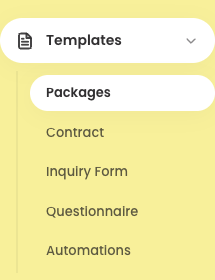
Expanded Templates navigation Templates used while a client is still deciding
Set up these templates before replying to inquiries or building proposals:
- Inquiry Form: captures a potential client’s answers and creates a new record in Leads.
- Packages: supplies reusable collections, packages, included items, and add-ons while you build proposal pricing.
- Contract: supplies the starting visuals, wording, payment milestones, and post-signing message for a proposal contract.
Templates used after work is booked
Template changes apply to future uses. Check existing client copies separately, as they may keep their original content.
- Questionnaire: becomes an editable, client-specific copy when assigned from a booking.
- Automations: provides built-in email wording and custom messages that can be attached to reminder timing.
Test your templates
Submit a test inquiry and check Leads. Then check your packages and contract in a proposal, your questionnaire in a booking, and your email template in a reply or reminder.
Notes
- Review a client-facing preview before sending a proposal, questionnaire, form, or gallery.