
Settings
How to Set Payment Defaults
Set invoice timing, tax, currency, payment instructions, and proposal milestones.
Payment defaults live under Settings > Business > Contract & financial information.
They provide starting values for new proposals and invoices. Review each client document before sending.
Decide the defaults before editing
Set the terms you want to use for new proposals and invoices.
Percentage payments cannot total more than 100%. The last payment is the balance.
Set financial defaults
Review Invoices due after (days), Default tax rate (%), Default currency, VAT / tax number, Accounting method, and Payment instructions.
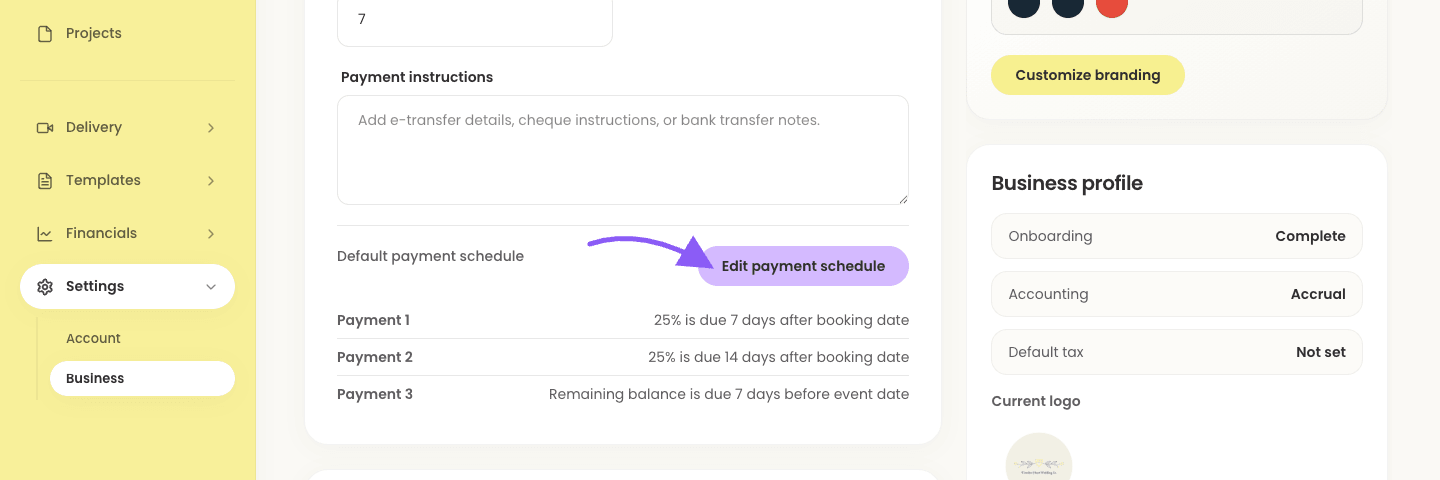
Business payment defaults Set proposal timing
- 1.
Set Proposal expiry (days) to choose how long clients have to accept.
- 2.
Click Edit payment schedule to set the default milestones.
- 1.
Build the default payment schedule
- 1.
Choose the number of payments.
- 2.
For each editable payment, choose percentage or fixed amount and set its timing from booking date or event date.
- 3.
The last payment remains the remaining balance.
- 1.
Important schedule limits
Keep the agreed payment schedule on signed proposals when changing defaults.
The business tax rate is also the default for shooter invoices unless it is explicitly overridden.
Save and test the defaults
- 1.
Keep percentage-based payments at 100% or less, then click Save.
- 2.
Test the defaults in a new proposal or invoice.
- 1.